
Stop making developers remember the ritual
A Taskfile turns project knowledge into a small, portable interface your team can actually use

Every project has a ritual.
Clone the repository. Install dependencies. Copy the right environment file. Start the database. Run migrations. Start the service. Seed data. Run tests. Build the app. Validate manifests. Format YAML. Parse some JSON. Push a branch. Open a PR. Wait for CI to tell you what you forgot.
Most teams do not call this a ritual. They call it “the setup”. Or “the usual commands”. Or “check the README”. But the shape is always the same: a set of important steps that live partly in documentation, partly in shell history, partly in CI, partly in the head of the person who has been on the project longest.
That is bad DevExp.
Not because developers are lazy. Because every remembered step is cognitive load. Every undocumented command is accidental onboarding cost. Every platform-specific script is a small tax on the team. Every difference between local development and CI is a future debugging session waiting to happen.
Task helps by giving the project a clear command interface.
Not a framework. Not a build system that wants to own your architecture. Not a replacement for npm, Docker, Kubernetes, Make, jq, yq or your test runner. Task is a thin, practical layer above the tools you already use. It gives those tools names, structure, dependencies, defaults, checks, prompts, descriptions and cross-platform execution.
A good Taskfile is not just automation.
It is executable project knowledge.
TL;DR
Task is a modern, cross-platform task runner configured with
Taskfile.ymlIt is especially useful when a project has repeated local, CI, container, Kubernetes, code generation or validation workflows
A Taskfile gives developers one stable interface, such as
task dev,task test,task verify,task docker:buildortask k8s:applyIt reduces setup friction because commands become discoverable with
task --listIt improves DevExp because project workflows stop depending on shell history, tribal knowledge and platform-specific scripts
It supports variables, environment files, dependencies, includes, task aliases, prompts, preconditions, incremental execution, watch mode, loops and templating
Dependencies declared with
depsrun in parallel, so sequential flows should call tasks explicitly fromcmdssources,generatesandstatusare key when you want Task to skip work that is already up to daterequires,preconditions,prompt,platformsand--dryhelp make dangerous or unclear workflows saferTask is cross-platform, but the commands you run inside Task may not be
User-specific paths should be configurable, not hardcoded into the shared Taskfile
Secrets should not live in the Taskfile. Task should orchestrate secret loading from environment files, secret managers, Docker secrets, Kubernetes Secrets or approved platform mechanisms
Kubernetes Secrets are not automatically a complete secret-management strategy
Large Taskfiles can be split into multiple included Taskfiles, but the project should still feel like one coherent interface
A Taskfile should be treated as part of the product’s engineering interface, not as a dumping ground for random commands
Index
Why DevExp needs a project command interface
What Task is
What Task is not
Where Task fits in the development workflow
Installation
Your first Taskfile
The mental model
Anatomy of a Taskfile
Task discovery and documentation
Variables, environment and dotenv files
User-specific paths and home directory configuration
Secrets: what Task should and should not do
Required inputs and interactive prompts
Dependencies and execution order
Calling tasks from other tasks
Cross-platform workflows
Incremental work with sources, generates and status
Preconditions, conditional execution and run policies
Includes and modular Taskfiles
Splitting Taskfiles by responsibility
Loops, matrices and repeated work
CLI arguments and wildcard tasks
Cleanup with defer
Output, silence and CI-friendly logs
Watch mode
Taskfile style guide
A complete practical single-file Taskfile
A complete modular Taskfile structure
Common mistakes
How to adopt Task in an existing project
Conclusions
1. Why DevExp needs a project command interface
A project without a command interface makes every developer reconstruct the system from pieces.
One person runs npm test. Another runs npm run test:unit. CI runs something else. Someone validates Kubernetes manifests with kubectl --dry-run=server. Another person uses kubeconform. Someone formats YAML manually. Someone else has a shell alias. The README says one thing, the Makefile says another, the package scripts say another, and the pipeline quietly contains the real truth.
This is where DevExp gets expensive.
The problem is not the individual command. The problem is the lack of a shared entry point.
A good project command interface gives the team a stable vocabulary:
task setup
task dev
task test
task verify
task build
task docker:build
task k8s:validate
The value is not only speed. The value is recoverability.
A new developer can ask the project what it knows how to do. A senior developer can encode a workflow once instead of explaining it ten times. CI can reuse the same local commands. Documentation can point to task names instead of fragile shell recipes. The project becomes easier to operate because the workflow is explicit.
That is the core reason Task matters.
It turns “ask someone who knows” into “run the project interface”.
2. What Task is
Task is a task runner configured with a Taskfile.yml.
It is inspired by Make, but it is designed around modern developer workflows and cross-platform usage. Instead of writing Make syntax, you write YAML. Instead of forcing every project command into a single shell script, you create named tasks with commands, dependencies, descriptions, variables and execution rules.
A task can be simple:
version: '3'

tasks:
  test:
    desc: Run the test suite
    cmds:
      - npm test
Then you run:
task testThat is the smallest useful idea.
The larger idea is that Task becomes the interface to the project:
version: '3'

tasks:
  setup:
    desc: Install project dependencies
    cmds:
      - npm ci

  dev:
    desc: Start the development server
    cmds:
      - npm run dev

  test:
    desc: Run the test suite
    cmds:
      - npm test

  verify:
    desc: Run local checks before pushing
    cmds:
      - task: test
      - task: build

  build:
    desc: Build the application
    cmds:
      - npm run build
A developer does not need to remember whether this project uses npm, pnpm, Docker Compose, kubectl, Helm, jq, yq, a custom script or a mixture of all of them.
They can start from the task names.
3. What Task is not
Task is not a replacement for your actual tools.
It does not replace Docker. It can call Docker.
It does not replace Kubernetes. It can call kubectl, Helm, kustomize, kubeconform or any validation tool you use.
It does not replace jq or yq. It can make them part of a repeatable workflow.
It does not replace npm scripts. It can wrap them behind stable names that survive changes in the underlying implementation.
It does not replace CI. It can make local and CI commands closer to each other.
This distinction matters.
The job of Task is not to become the center of your architecture. The job of Task is to make the useful operations of the project easy to discover, easy to run and hard to misunderstand.
That is why it works well for DevExp.
4. Where Task fits in the development workflow
Task sits between the people who need to work with the project and the tools that actually do the work.
It gives the project a small command surface.
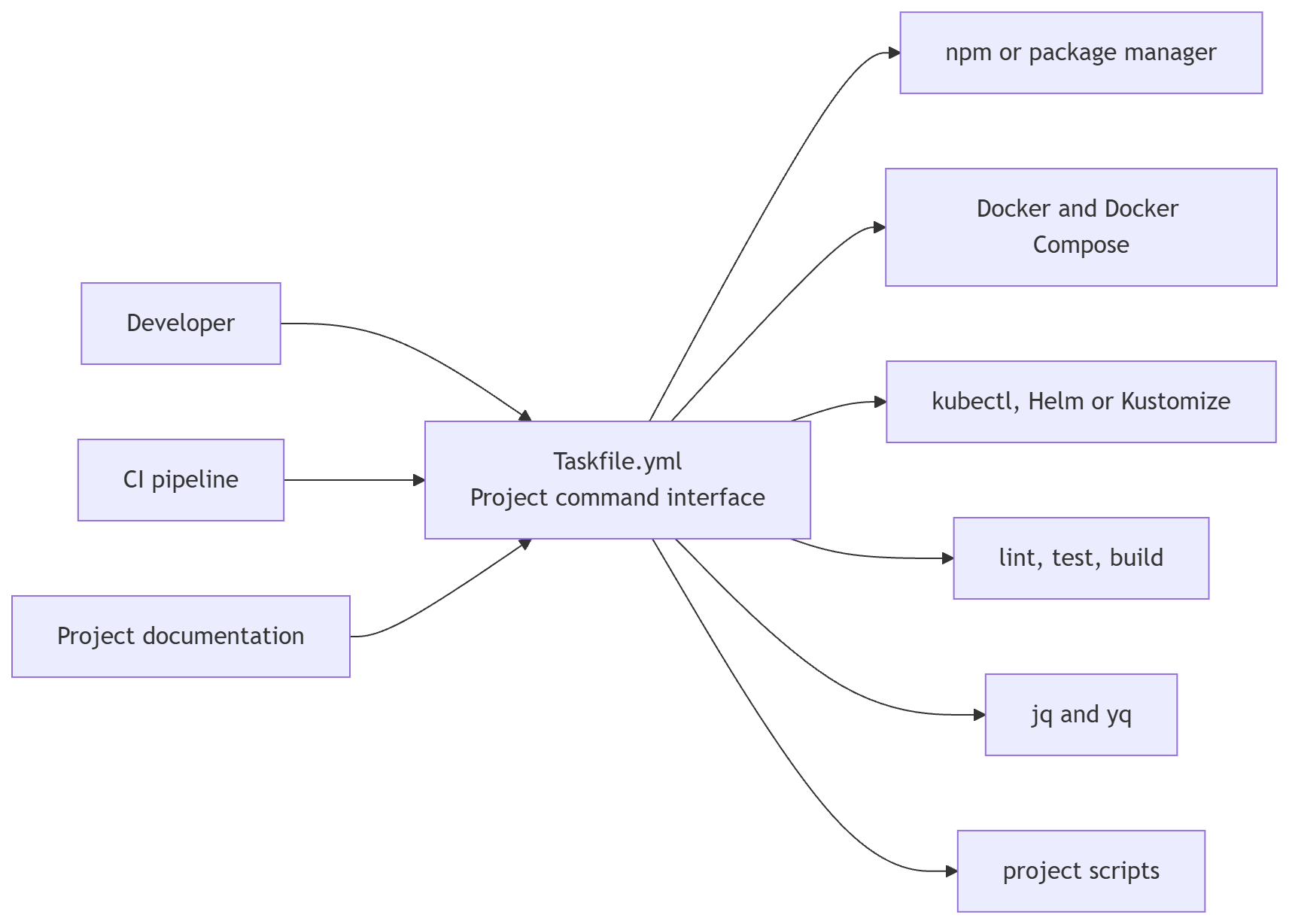
This diagram matters because it shows the right mental model.
Task is not the whole delivery system. It is the interface to the delivery system.
That means a Taskfile should not try to hide everything. It should hide accidental complexity and expose meaningful operations.
task verify is meaningful.
task run-weird-local-thing-that-only-works-on-my-laptop is not.
The interface should teach the project.
5. Installation
Task supports several installation methods.
For macOS or Linux with the official Homebrew tap:
brew install go-task/tap/go-taskWith the official Homebrew repository:
brew install go-taskWith npm:
npm install -g @go-task/cliWith Winget on Windows:
winget install Task.TaskWith Snap:
sudo snap install task --classicIn GitHub Actions:
- name: Install Task
  uses: go-task/setup-task@v1
After installation:
task --versionFor teams, the installation choice should be part of the project documentation. If developers use different operating systems, prefer an installation path that works clearly across macOS, Linux and Windows.
6. Your first Taskfile
Create a Taskfile.yml:
task --initOr write one manually:
version: '3'

tasks:
  hello:
    desc: Print a greeting
    cmds:
      - echo "Hello from Task"
Run it:
task helloA task named default can be executed by running task with no task name:
version: '3'

tasks:
  default:
    desc: Show available tasks
    cmds:
      - task --list
    silent: true

  hello:
    desc: Print a greeting
    cmds:
      - echo "Hello from Task"
Now:
taskprints the available tasks.
This is a strong default for many projects because it turns the Taskfile into a self-documenting entry point.
7. The mental model
A Taskfile has four jobs.
First, it names workflows.
A name like task verify is easier to remember than a chain of package scripts, shell commands and flags.
Second, it hides implementation detail.
A task called test can call npm test today and vitest run tomorrow. The team command stays stable.
Third, it makes workflows discoverable.
A developer can run:
task --listand see the main tasks with descriptions.
Fourth, it turns repeated project operations into executable documentation.
This is the real DevExp benefit. The project stops saying “read this long setup guide and assemble the commands yourself”. It starts saying “run these named operations”.
That changes the feeling of working with the system.
A good Taskfile does not only make the happy path shorter. It makes the project more legible.
8. Anatomy of a Taskfile
A typical Taskfile uses these sections:
version: '3'

includes:
  docker: ./taskfiles/Docker.yml

vars:
  APP_NAME: checkout-api

env:
  NODE_ENV: development

tasks:
  test:
    desc: Run tests
    cmds:
      - npm test
The usual sections are:
versionfor the Taskfile schema versionincludesfor importing other Taskfilesvarsfor Task variablesenvordotenvfor environment variablestasksfor the actual project commands
The official style guide recommends this broad ordering:
version:
includes:
# optional configurations
vars:
env:
tasks:
In practice, a clean Taskfile should read like a project interface, not like a random list of shortcuts.
A useful rule:
If a developer needs to know it to work on the project, it probably deserves a task
9. Task discovery and documentation
Task supports descriptions and summaries.
Descriptions appear in task --list:
version: '3'

tasks:
  test:
    desc: Run the test suite
    cmds:
      - npm test

  build:
    desc: Build the application
    cmds:
      - npm run build
Run:
task --listTo show all tasks, including tasks without descriptions:
task --list-allor:
task -aFor longer documentation, use summary:
version: '3'

tasks:
  release:
    desc: Release the service
    summary: |
      Builds, verifies and publishes the service

      Required inputs:
      - VERSION
      - ENV
    cmds:
      - ./scripts/release.sh "{{.VERSION}}" "{{.ENV}}"
Then:
task --summary releaseThe summary is not executed. It explains.
This is important. A Taskfile can become part of the teaching material of a project. A new developer should be able to learn the operational shape of the system by listing and summarising tasks.
The Taskfile is not a substitute for all documentation. It is a bridge between documentation and action.
10. Variables, environment and dotenv files
Task has variables and environment variables.
Use vars when you want values for templating:
version: '3'

vars:
  APP_NAME: checkout-api
  IMAGE: checkout-api:local

tasks:
  print:
    desc: Print project variables
    cmds:
      - echo "App {{.APP_NAME}}"
      - echo "Image {{.IMAGE}}"
Use env when the executed command needs environment variables:
version: '3'

env:
  NODE_ENV: development

tasks:
  dev:
    desc: Start the app in development mode
    cmds:
      - npm run dev
Use dotenv when the project should load variables from .env style files:
version: '3'

dotenv:
  - .env.local
  - .env

tasks:
  dev:
    desc: Start the app with local environment variables
    cmds:
      - npm run dev
When several dotenv files define the same variable, the first file in the list takes precedence. That makes this pattern useful:
version: '3'

dotenv:
  - .env.local
  - .env.development
  - .env
The priority is intentional:
.env.localfor developer-specific overrides.env.developmentfor development defaults.envfor base defaults
Be careful with secrets. Task can load.envfiles, but that does not mean secrets should be committed. Treat the Taskfile as workflow definition, not as a secret store.
There is also a subtle design question here.
A variable in vars is part of the Taskfile’s internal templating model. An environment variable in env is part of the environment passed to commands. That distinction keeps Taskfiles easier to understand.
For example:
version: '3'

vars:
  APP_NAME: checkout-api

env:
  NODE_ENV: development

tasks:
  dev:
    desc: Start the development server
    cmds:
      - echo "Starting {{.APP_NAME}} with NODE_ENV=$NODE_ENV"
      - npm run dev
APP_NAME is a Task variable.
NODE_ENV is an environment variable used by the command.
Do not mix these concepts accidentally. Use the one that matches the reason the value exists.
11. User-specific paths and home directory configuration
A Taskfile usually lives in the repository.
That creates a useful constraint: the Taskfile should describe the shared workflow, but it should not assume that every developer has the same machine.
This is where many automation files quietly become hostile.
They contain paths like this:
version: '3'

tasks:
  open-config:
    cmds:
      - code /home/emmanuel/.config/my-tool/config.yml
That works for one person.
It fails for everyone else.
A good Taskfile should separate three things:
Project paths
User-specific paths
Secrets
Project paths belong in the repository.
User-specific paths belong in environment variables, local configuration files or optional local Taskfiles.
Secrets belong in a secret manager, the local shell environment, Docker secrets, Kubernetes Secrets or another controlled runtime mechanism.
The Taskfile can orchestrate all of them, but it should not become the place where private machine state or confidential values are stored.
Project paths should be relative to the repository
Most project paths should be relative.
version: '3'

vars:
  K8S_DIR: k8s
  DIST_DIR: dist

tasks:
  build:
    desc: Build the application
    cmds:
      - npm run build

  k8s:validate:
    desc: Validate Kubernetes manifests
    cmds:
      - yq eval '.' "{{.K8S_DIR}}"/*.yaml > /dev/null
      - kubectl apply --dry-run=client -f "{{.K8S_DIR}}"
This is portable because the path belongs to the project.
No developer name. No absolute path. No operating system assumption.
When you need an absolute project path, Task gives you useful built-in variables:
version: '3'

tasks:
  paths:info:
    desc: Print useful Task paths
    cmds:
      - echo "Root directory {{.ROOT_DIR}}"
      - echo "Current Taskfile directory {{.TASKFILE_DIR}}"
      - echo "Task execution directory {{.TASK_DIR}}"
      - echo "User working directory {{.USER_WORKING_DIR}}"
This is especially useful when the Taskfile is included from another directory, or when you run a global Taskfile.
Use the home directory carefully
Sometimes a task needs something from the user’s home directory.
Examples:
A local tool configuration
A personal certificate
A local kubeconfig
A personal cache directory
A private
.envfile
The simplest form is this:
version: '3'

dotenv:
  - .env.local
  - .env
  - '{{.HOME}}/.checkout-api.env'

tasks:
  dev:
    desc: Start the app with project and personal environment files
    cmds:
      - npm run dev
This pattern says:
First read
.env.localfrom the projectThen read
.envfrom the projectThen read a personal file from the user’s home directory
This can be useful, but be careful.HOMEis commonly available in Unix-like environments. On cross-platform teams, it is often cleaner to define explicit local paths through variables.
For example:
version: '3'

vars:
  TOOL_CONFIG_FILE: '{{joinPath .HOME ".config" "checkout-api" "config.yml"}}'

tasks:
  config:show:
    desc: Show the resolved local configuration path
    cmds:
      - echo "{{.TOOL_CONFIG_FILE}}"

  config:check:
    desc: Check that the local configuration file exists
    preconditions:
      - sh: test -f "{{.TOOL_CONFIG_FILE}}"
        msg: Create {{.TOOL_CONFIG_FILE}} before running this task
    cmds:
      - echo "Local configuration file exists"
A developer can still override the variable when needed:
task config:show TOOL_CONFIG_FILE="$HOME/dev/configs/checkout-api/config.yml"The Taskfile no longer needs to know where every user keeps their development files.
That is the important design move.
Use path helpers when paths need to be composed
String concatenation works until paths become slightly different across platforms.
A better approach is to compose paths explicitly:
version: '3'

vars:
  LOCAL_CERT_DIR: '{{joinPath .HOME ".certs" "checkout-api"}}'
  LOCAL_CERT_FILE: '{{joinPath .LOCAL_CERT_DIR "dev.crt"}}'

tasks:
  cert:show-path:
    desc: Show the expected local certificate path
    cmds:
      - echo "{{.LOCAL_CERT_FILE}}"

  cert:check:
    desc: Check that the local development certificate exists
    preconditions:
      - sh: test -f "{{.LOCAL_CERT_FILE}}"
        msg: Create {{.LOCAL_CERT_FILE}} before starting HTTPS locally
    cmds:
      - echo "Local certificate is present"
This makes the intention visible.
The user-specific root is configurable. The rest of the path is constructed by the Taskfile.
For commands that need forward slashes, Task also provides path conversion helpers:
version: '3'

tasks:
  paths:normalize:
    desc: Show path conversions
    vars:
      RAW_PATH: '{{.RAW_PATH | default "C:\\Users\\name\\project"}}'
    cmds:
      - echo "Forward slashes {{.RAW_PATH | toSlash}}"
      - echo "OS-specific slashes {{.RAW_PATH | fromSlash}}"
Use this when a tool expects one path style, but your team uses multiple operating systems.
Keep personal overrides outside the shared Taskfile
A useful pattern is to support an optional local Taskfile.
Root Taskfile.yml:
version: '3'

includes:
  local:
    taskfile: ./Taskfile.local.yml
    optional: true
    internal: false

tasks:
  default:
    desc: Show available tasks
    cmds:
      - task --list
    silent: true

  dev:
    desc: Start the development server
    cmds:
      - npm run dev
Then add this to .gitignore:
Taskfile.local.ymlA developer can create their own local tasks:
version: '3'

tasks:
  tunnel:
    desc: Start my local tunnel
    cmds:
      - cloudflared tunnel run checkout-api-dev

  open-db:
    desc: Open my local database client
    cmds:
      - open -a TablePlus
The shared project interface remains clean.
The personal workflow is still automated.
No one else has to inherit one developer’s machine setup.
Use a global Taskfile for personal machine automation
Task also supports global Taskfiles.
When you run:
task -g some-taskTask looks for a Taskfile in your home directory.
That is useful for personal automation that is not project-specific.
For example, a developer could keep this at ~/Taskfile.yml:
version: '3'

tasks:
  projects:
    desc: Print the projects directory
    cmds:
      - echo "{{.HOME}}/projects"

  clean-docker:
    desc: Clean unused Docker resources
    prompt: Remove unused Docker resources?
    cmds:
      - docker system prune
There is one important detail.
When running a global Taskfile, tasks run from the home directory by default. If the task should operate on the directory where the command was called, use {{.USER_WORKING_DIR}}.
version: '3'

tasks:
  repo:status:
    desc: Show Git status for the directory where task was called
    dir: '{{.USER_WORKING_DIR}}'
    preconditions:
      - sh: test -d .git
        msg: This task must be run inside a Git repository
    cmds:
      - git status --short
Now this works from any repository:
task -g repo:statusThis is excellent for personal workflows.
It should not replace project Taskfiles. The project should still expose its own shared interface.
Move Task’s internal cache when needed
Task stores checksum data in a local .task directory by default when using mechanisms such as sources and generates.
For most repositories, add this to .gitignore:
.task/Some developers prefer to keep that state outside the project directory.
They can configure:
export TASK_TEMP_DIR='~/.task'This is useful when you want repository directories to stay cleaner, or when tooling aggressively watches project files and you do not want .task to appear inside the working tree.
The Taskfile does not need to change.
This is a machine-level preference.
12. Secrets: what Task should and should not do
Task can help with secrets.
But Task should not become the secret store.
A Taskfile is normally committed to Git. That means this is wrong:
version: '3'

env:
  DB_PASSWORD: super-secret-password

tasks:
  dev:
    cmds:
      - npm run dev
It is also risky to commit a real .env file:
DB_USER=checkout
DB_PASSWORD=super-secret-password
STRIPE_SECRET_KEY=sk_live_real_value
The better rule is simple:
Commit examples, not secrets
For example, commit .env.example:
DB_USER=checkout
DB_PASSWORD=
STRIPE_SECRET_KEY=
Ignore real local files:
.env
.env.local
.env.*.local
Then let Task load local configuration if it exists:
version: '3'

dotenv:
  - .env.local
  - .env

tasks:
  dev:
    desc: Start the app with local environment
    preconditions:
      - sh: test -f .env.local
        msg: Create .env.local from .env.example before running the app
    cmds:
      - npm run dev
This is acceptable for low-risk local development secrets, but it is not enough for higher-risk credentials or shared team secrets.
For those, use a secret manager.
The boundary should be clear.
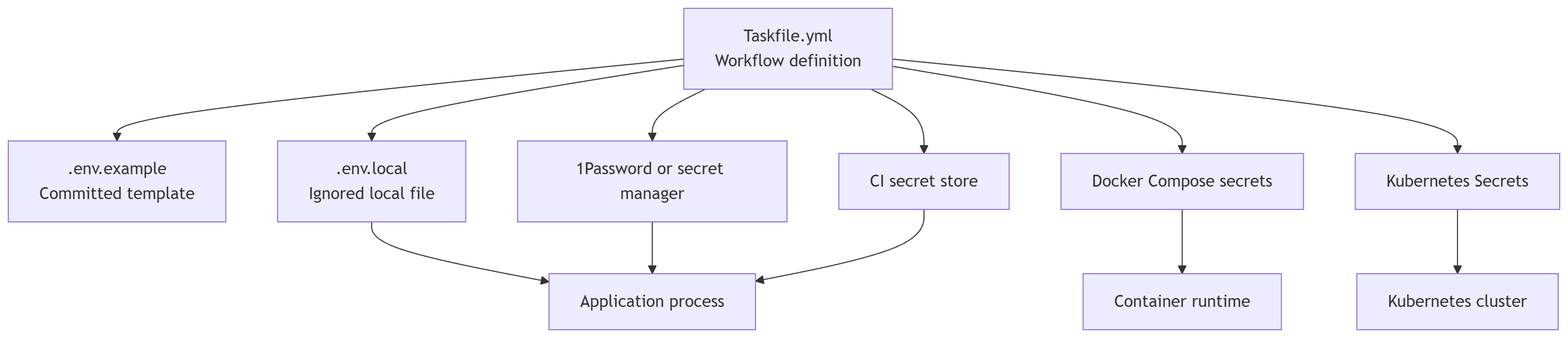
Task defines how secrets are loaded.
Task should not contain the secret values.
That distinction protects the project from a common failure mode: automation that makes the happy path convenient by making sensitive data too easy to leak.
Example 1: Running local development with 1Password CLI
A clean pattern is to store secret references in a local file, not raw secret values.
.env.1password:
DB_USER=op://checkout-api-dev/database/username
DB_PASSWORD=op://checkout-api-dev/database/password
STRIPE_SECRET_KEY=op://checkout-api-dev/stripe/secret-key
Then Task can run the app through op run:
version: '3'

tasks:
  dev:secure:
    desc: Start the app with secrets loaded from 1Password
    preconditions:
      - sh: command -v op
        msg: 1Password CLI is required
      - sh: test -f .env.1password
        msg: Create .env.1password with 1Password secret references
    cmds:
      - op run --env-file .env.1password -- npm run dev
This has a better shape than storing the real values in the repository.
The Taskfile contains the workflow.
The .env.1password file contains references.
1Password contains the actual secrets.
If the team wants to commit the reference file, check that the references do not expose sensitive naming conventions. In many teams, keeping .env.1password.example in Git and .env.1password ignored locally is a safer default.
Example .env.1password.example:
DB_USER=op://vault/item/username
DB_PASSWORD=op://vault/item/password
STRIPE_SECRET_KEY=op://vault/item/secret-key
Example .gitignore:
.env.1passwordExample 2: Running tests with required secrets
Some integration tests require credentials.
The Taskfile can make that explicit and pass the values to the command environment:
version: '3'

tasks:
  test:integration:
    desc: Run integration tests that require database credentials
    requires:
      vars: [DB_USER, DB_PASSWORD]
    env:
      DB_USER: '{{.DB_USER}}'
      DB_PASSWORD: '{{.DB_PASSWORD}}'
    cmds:
      - npm run test:integration
Run it with variables:
task test:integration DB_USER=checkout DB_PASSWORD=secretOr with 1Password:
version: '3'

tasks:
  test:integration:secure:
    desc: Run integration tests with secrets from 1Password
    preconditions:
      - sh: command -v op
        msg: 1Password CLI is required
      - sh: test -f .env.1password
        msg: Create .env.1password with secret references
    cmds:
      - op run --env-file .env.1password -- task test:integration
This keeps the public task stable.
The secure variant handles secret injection.
The important detail is that requires makes the required input explicit, while env ensures the executed command receives the variables it needs.
Example 3: Docker Compose secrets for local infrastructure
If the project uses Docker Compose, prefer mounting secrets as files when the application supports it.
compose.yml:
services:
  postgres:
    image: postgres:16
    environment:
      POSTGRES_USER: checkout
      POSTGRES_PASSWORD_FILE: /run/secrets/postgres_password
      POSTGRES_DB: checkout
    secrets:
      - postgres_password
    ports:
      - "5432:5432"

secrets:
  postgres_password:
file: ./secrets/postgres_password.txt.gitignore:
secrets/Taskfile:
version: '3'

tasks:
  compose:up:
    desc: Start local infrastructure with Docker Compose secrets
    preconditions:
      - sh: command -v docker
        msg: Docker is required
      - sh: test -f secrets/postgres_password.txt
        msg: Create secrets/postgres_password.txt before starting Compose
    cmds:
      - docker compose up -d
This pattern avoids putting the secret value in the Compose file.
The secret is still local, so protect the file properly. But the repository no longer contains the secret.
For onboarding, provide a safe setup task:
version: '3'

tasks:
  secrets:init:
    desc: Create local secret files for development
    cmds:
      - mkdir -p secrets
      - test -f secrets/postgres_password.txt || printf "checkout-dev-password\n" > secrets/postgres_password.txt
      - cmd: chmod 600 secrets/postgres_password.txt
        platforms: [linux, darwin]
This is suitable only for local development credentials.
Do not use a generated shared password like this for production.
The chmod command is limited to Linux and macOS because it is not a native PowerShell command. This is an example of an important principle: Task is cross-platform, but every command inside a task still has its own platform behaviour.
Example 4: Docker build secrets
Sometimes the build needs access to a private package registry.
Do not bake the token into the image.
Bad:
ARG NPM_TOKEN
RUN npm config set //registry.npmjs.org/:_authToken=$NPM_TOKEN
Better pattern with Docker BuildKit secrets:
RUN --mount=type=secret,id=npmrc,target=/root/.npmrc npm ciTaskfile:
version: '3'

tasks:
  docker:build:
    desc: Build the image using a local npm secret
    preconditions:
      - sh: test -f "{{.HOME}}/.npmrc"
        msg: ~/.npmrc is required for private package installation
    cmds:
      - docker build --secret id=npmrc,src="{{.HOME}}/.npmrc" -t checkout-api:local .
The secret is available to the build step as a mounted secret.
It is not written into the Taskfile.
It is not passed as a normal build argument.
It is not intended to remain in the final image.
Example 5: Creating a Kubernetes Secret from local files
For Kubernetes, the Taskfile can create a Secret from local files.
First, keep the local secret file out of Git:
.local-secrets/Local file:
.local-secrets/db-passwordTaskfile:
version: '3'

vars:
  NAMESPACE: dev
  SECRET_NAME: checkout-api-secrets

tasks:
  k8s:secret:create:
    desc: Create or update the app Kubernetes Secret from local files
    preconditions:
      - sh: command -v kubectl
        msg: kubectl is required
      - sh: test -f .local-secrets/db-password
        msg: Create .local-secrets/db-password first
    cmds:
      - |
        kubectl create secret generic "{{.SECRET_NAME}}" \
          --namespace "{{.NAMESPACE}}" \
          --from-file=db-password=.local-secrets/db-password \
          --dry-run=client \
          -o yaml | kubectl apply -f -
Then the deployment can consume the secret.
Example Kubernetes fragment:
apiVersion: apps/v1
kind: Deployment
metadata:
  name: checkout-api
spec:
  template:
    spec:
      containers:
        - name: checkout-api
          image: checkout-api:local
          env:
            - name: DB_PASSWORD
              valueFrom:
                secretKeyRef:
                  name: checkout-api-secrets
                  key: db-password
This is a practical local development pattern.
For production, the better pattern usually involves a controlled secret delivery mechanism, such as a cloud secret manager, External Secrets Operator, Sealed Secrets, SOPS, Vault or your platform’s approved secret workflow.
A Kubernetes Secret is not automatically a complete secret-management strategy. By default, Kubernetes stores Secrets in the API server data store without encryption at rest unless encryption at rest and access control are configured properly.
Task can orchestrate the workflow, but it should not invent the security model.
Example 6: Creating a Kubernetes Secret from 1Password at runtime
You can combine Task, 1Password and kubectl.
.env.1password:
DB_PASSWORD=op://checkout-api-dev/database/passwordTaskfile:
version: '3'

vars:
  NAMESPACE: dev
  SECRET_NAME: checkout-api-secrets

tasks:
  k8s:secret:create-from-1password:
    desc: Create or update the app Kubernetes Secret from 1Password
    preconditions:
      - sh: command -v op
        msg: 1Password CLI is required
      - sh: command -v kubectl
        msg: kubectl is required
      - sh: test -f .env.1password
        msg: Create .env.1password with secret references
    cmds:
      - |
        op run --env-file .env.1password -- sh -c '
          kubectl create secret generic "{{.SECRET_NAME}}" \
            --namespace "{{.NAMESPACE}}" \
            --from-literal=db-password="$DB_PASSWORD" \
            --dry-run=client \
            -o yaml | kubectl apply -f -
        '
This keeps the secret out of the repository and out of the Taskfile.
The secret exists in the subprocess environment while the command runs.
The resulting Kubernetes Secret exists in the cluster.
This is still sensitive. Access to the cluster and namespace now matters. Anyone with enough permission to read that Secret can access the value.
Task makes the workflow repeatable. It does not remove the need for proper access control.
Example 7: Validating that secrets exist without printing them
A common mistake is to debug by printing secrets.
Do not do this:
version: '3'

tasks:
  debug-secret:
    cmds:
      - echo "$DB_PASSWORD"
Instead, validate presence without revealing the value:
version: '3'

tasks:
  secrets:check:
    desc: Check required secret variables without printing values
    requires:
      vars: [DB_PASSWORD, STRIPE_SECRET_KEY]
    cmds:
      - echo "Required secret variables are present"
Or with shell checks:
version: '3'

tasks:
  secrets:check:
    desc: Check required secret variables without printing values
    cmds:
      - test -n "$DB_PASSWORD"
      - test -n "$STRIPE_SECRET_KEY"
      - echo "Required secret variables are present"
The task should prove readiness.
It should not leak values into the terminal, CI logs or shared screenshots.
13. Required inputs and interactive prompts
Some tasks should not run without explicit input.
A deployment task is a good example. Running it without ENV or VERSION should fail early with a clear message, not halfway through a script.
Task supports requires:
version: '3'

tasks:
  deploy:
    desc: Deploy a specific version
    requires:
      vars: [ENV, VERSION]
    cmds:
      - ./scripts/deploy.sh "{{.ENV}}" "{{.VERSION}}"
Run:
task deploy ENV=staging VERSION=1.4.2You can restrict a variable to allowed values:
version: '3'

tasks:
  deploy:
    desc: Deploy a specific version to a known environment
    requires:
      vars:
        - name: ENV
          enum: [dev, staging, prod]
        - VERSION
    cmds:
      - ./scripts/deploy.sh "{{.ENV}}" "{{.VERSION}}"
You can also define allowed values once and reuse them:
version: '3'

vars:
  ALLOWED_ENVS: [dev, staging, prod]

tasks:
  deploy:
    desc: Deploy a specific version
    requires:
      vars:
        - name: ENV
          enum:
            ref: .ALLOWED_ENVS
        - VERSION
    cmds:
      - ./scripts/deploy.sh "{{.ENV}}" "{{.VERSION}}"
Interactive mode can prompt users for missing required variables when a terminal is available:
version: '3'

tasks:
  deploy:
    desc: Deploy a version interactively when inputs are missing
    requires:
      vars:
        - name: ENV
          enum: [dev, staging, prod]
        - VERSION
    cmds:
      - echo "Deploying {{.VERSION}} to {{.ENV}}"
Run:
task deploy --interactiveThis is useful for local workflows, but CI should pass variables explicitly.
For dangerous tasks, use warning prompts:
version: '3'

tasks:
  prod:delete:
    desc: Delete production resources
    prompt:
      - This will delete production resources. Continue?
      - Are you completely sure?
    cmds:
      - ./scripts/delete-production-resources.sh
Prompts are not a security boundary. They are a friction point that helps avoid accidental execution.
For CI, avoid interactive assumptions. Pass values explicitly, use non-interactive configuration and be careful with prompt-skipping flags.
14. Dependencies and execution order
Task supports dependencies with deps.
version: '3'

tasks:
  build:
    desc: Build the application
    deps: [assets]
    cmds:
      - npm run build

  assets:
    desc: Build frontend assets
    cmds:
      - npm run build:assets
When you run:
task buildTask runs assets first.
The most important rule is this:
Dependencies run in parallel when there is more than one dependency
That is good for independent work:
version: '3'

tasks:
  assets:
    desc: Build all assets
    deps: [js, css]

  js:
    cmds:
      - npm run build:js

  css:
    cmds:
      - npm run build:css
But it is wrong for workflows that need strict order.
This can be wrong:
version: '3'

tasks:
  verify:
    deps: [lint, test, build]
If build depends on generated files from test or lint, this is not the right structure.
Use explicit task calls inside cmds when order matters:
version: '3'

tasks:
  verify:
    desc: Run checks in a deliberate order
    cmds:
      - task: lint
      - task: test
      - task: build

  lint:
    cmds:
      - npm run lint

  test:
    cmds:
      - npm test

  build:
    cmds:
      - npm run build
This is one of the most important design decisions in Taskfiles:
Use deps for independent prerequisites
Use cmds with task: for sequential workflows
15. Calling tasks from other tasks
A task can call another task:
version: '3'

tasks:
  verify:
    desc: Run all verification steps
    cmds:
      - task: lint
      - task: test
      - task: build

  lint:
    cmds:
      - npm run lint

  test:
    cmds:
      - npm test

  build:
    cmds:
      - npm run build
You can pass variables:
version: '3'

tasks:
  docker:build:
    desc: Build a Docker image
    vars:
      IMAGE: checkout-api:local
    cmds:
      - docker build -t "{{.IMAGE}}" .

  docker:build:prod:
    desc: Build the production Docker image
    cmds:
      - task: docker:build
        vars:
          IMAGE: checkout-api:prod
This keeps the public interface small while allowing reuse.
A useful pattern is to create internal tasks for shared implementation details.
version: '3'

tasks:
  docker:build:
    desc: Build the local Docker image
    cmds:
      - task: _docker-build
        vars:
          IMAGE: checkout-api:local

  docker:build:prod:
    desc: Build the production Docker image
    cmds:
      - task: _docker-build
        vars:
          IMAGE: checkout-api:prod

  _docker-build:
    internal: true
    requires:
      vars: [IMAGE]
    cmds:
      - docker build -t "{{.IMAGE}}" .
The public tasks express intent. The internal task holds the implementation.
That is good interface design.
16. Cross-platform workflows
Task is valuable because it helps a team avoid maintaining separate local workflows for macOS, Linux and Windows.
There are several practical rules.
First, prefer task names over shell aliases.
A shell alias is personal. A task is part of the repository.
Second, avoid putting too much shell logic directly in the Taskfile.
If logic becomes complex, move it to a script:
version: '3'

tasks:
  migrate:
    desc: Run database migrations
    cmds:
      - ./scripts/migrate.sh
Third, use platform filters when a command is genuinely platform-specific:
version: '3'

tasks:
  open:
    desc: Open the local app in a browser
    cmds:
      - cmd: open http://localhost:3000
        platforms: [darwin]
      - cmd: xdg-open http://localhost:3000
        platforms: [linux]
      - cmd: start http://localhost:3000
        platforms: [windows]
Fourth, use Task template functions for paths and executable extensions when needed:
version: '3'

tasks:
  build:
    desc: Build a binary with the right extension for the platform
    cmds:
      - go build -o "bin/app{{exeExt}}" ./cmd/app
Fifth, treat platform support as a design decision.
Task is cross-platform, but the commands you orchestrate may not be. If a workflow must work on native Windows, macOS and Linux, either use platform-specific commands with platforms, or move the logic to a script written in a cross-platform runtime already used by the project.
For example, if your project already uses Node.js, a script like this can be more portable than shell-specific file logic:
import { mkdirSync, existsSync, writeFileSync, chmodSync } from "node:fs";
import { join } from "node:path";

const secretsDir = ".local-secrets";
const passwordFile = join(secretsDir, "db-password");

mkdirSync(secretsDir, { recursive: true });

if (!existsSync(passwordFile)) {
  writeFileSync(passwordFile, "checkout-dev-password\n", { encoding: "utf8" });
}

try {
  chmodSync(passwordFile, 0o600);
} catch {
  // Some platforms or filesystems may not support POSIX permissions
}
Then Task can call the script:
version: '3'

tasks:
  secrets:init:
    desc: Create local development secret files
    cmds:
      - node scripts/init-local-secrets.js
That is often a better DevExp than filling the Taskfile with platform-specific shell branches.
17. Incremental work with sources, generates and status
Some tasks do expensive work.
Build assets. Generate code. Build an image. Compile binaries. Produce documentation. Validate many files.
Task can skip work when inputs have not changed.
Use sources to describe inputs and generates to describe outputs:
version: '3'

tasks:
  build:
    desc: Build only when source files changed
    sources:
      - package.json
      - package-lock.json
      - 'src/**/*.js'
    generates:
      - dist/server.js
    cmds:
      - npm run build
By default, Task uses checksums. You can use timestamps instead:
version: '3'

tasks:
  build:
    desc: Build using timestamp checks
    method: timestamp
    sources:
      - package.json
      - package-lock.json
      - 'src/**/*.js'
    generates:
      - dist/server.js
    cmds:
      - npm run build
You can configure the method globally:
version: '3'

method: timestamp

tasks:
  build:
    sources:
      - 'src/**/*.js'
    generates:
      - dist/server.js
    cmds:
      - npm run build
Use status when the task’s output is not a simple local file.
For example, a Docker image:
version: '3'

tasks:
  docker:build:
    desc: Build the Docker image if it is missing
    vars:
      IMAGE: checkout-api:local
    status:
      - docker image inspect "{{.IMAGE}}" > /dev/null 2>&1
    cmds:
      - docker build -t "{{.IMAGE}}" .
If the status command returns success, Task treats the task as up to date.
You can force execution:
task docker:build --forceYou can check status without running the task:
task docker:build --statusThis is useful in CI and local workflows because it makes expensive work conditional instead of habitual.
18. Preconditions, conditional execution and run policies
status answers this question:
Is this task already done?
preconditions answer a different question:
Is it valid to run this task now?
Example:
version: '3'

tasks:
  dev:
    desc: Start the development server
    preconditions:
      - sh: test -f package.json
        msg: Run this task from a project with package.json
      - sh: test -f .env.local
        msg: Create .env.local before starting the service
    cmds:
      - npm run dev
If a precondition fails, the task fails before running its commands.
Use this for required files, required tools, expected directories, local configuration and dangerous assumptions.
Task also supports if, which skips instead of failing:
version: '3'

tasks:
  verify:
    desc: Run optional checks when their configuration exists
    cmds:
      - cmd: npm run lint
        if: test -f package.json
      - cmd: yq --version
        if: command -v yq
Use if when skipping is acceptable.
Use preconditions when skipping would hide a real problem.
Task also supports run policies:
version: '3'

tasks:
  setup:
    run: once
    cmds:
      - npm ci

  generate:
    run: when_changed
    cmds:
      - echo "{{.TARGET}}"
The main options are:
alwaysto attempt the task every timeonceto run only once within a Task invocationwhen_changedto run once for each unique set of variables
This becomes useful when one task is called multiple times by other tasks.
19. Includes and modular Taskfiles
A single Taskfile can become too large.
Task supports includes:
version: '3'

includes:
  docker: ./taskfiles/Docker.yml
  k8s: ./taskfiles/Kubernetes.yml
  docs: ./taskfiles/Docs.yml

tasks:
  verify:
    desc: Run project verification
    cmds:
      - task: docker:build
      - task: k8s:validate
      - task: docs:check
If taskfiles/Docker.yml contains:
version: '3'

tasks:
  build:
    desc: Build the Docker image
    cmds:
      - docker build -t checkout-api:local .
Then you run:
task docker:buildIncludes are especially useful in monorepos:
version: '3'

includes:
  api:
    taskfile: ./services/api/Taskfile.yml
    dir: ./services/api

  web:
    taskfile: ./services/web/Taskfile.yml
    dir: ./services/web
Then:
task api:test
task web:test
You can pass variables to included Taskfiles:
version: '3'

includes:
  backend:
    taskfile: ./taskfiles/Docker.yml
    vars:
      DOCKER_IMAGE: backend_image

  frontend:
    taskfile: ./taskfiles/Docker.yml
    vars:
      DOCKER_IMAGE: frontend_image
You can also make includes optional:
version: '3'

includes:
  local:
    taskfile: ./Taskfile.local.yml
    optional: true
This is useful when each developer may have private local tasks that should not be required by the project.
Use includes when they improve navigation. Do not split a Taskfile just because it is possible. Split by responsibility:
Docker tasks
Kubernetes tasks
Documentation tasks
Code generation tasks
Release tasks
Service-specific tasks in a monorepo
One important detail: root-leveldotenvdeclarations cannot currently live inside included Taskfiles. Put shared dotenv loading in the main Taskfile, or use task-level dotenv where that is the right local choice.
20. Splitting Taskfiles by responsibility
At some point, a Taskfile stops feeling like a project interface and starts feeling like a long utility drawer.
That is the moment to split it.
Not before.
Splitting Taskfiles is useful when it makes the workflow easier to understand. It is harmful when it forces people to jump across files just to understand a simple project.
A good split keeps the main Taskfile.yml as the entrance to the project.
.
├── Taskfile.yml
├── taskfiles
│   ├── Dev.yml
│   ├── Quality.yml
│   ├── Docker.yml
│   ├── Kubernetes.yml
│   ├── Secrets.yml
│   └── Docs.yml
├── package.json
├── Dockerfile
├── compose.yml
└── k8s
    ├── deployment.yaml
    └── service.yaml
The root Taskfile should explain the project’s main operations:
version: '3'

vars:
  APP_NAME: checkout-api
  NAMESPACE: dev
  IMAGE: checkout-api:local

dotenv:
  - .env.local
  - .env

includes:
  dev:
    taskfile: ./taskfiles/Dev.yml
  quality:
    taskfile: ./taskfiles/Quality.yml
  docker:
    taskfile: ./taskfiles/Docker.yml
    vars:
      IMAGE: '{{.IMAGE}}'
  k8s:
    taskfile: ./taskfiles/Kubernetes.yml
    vars:
      APP_NAME: '{{.APP_NAME}}'
      NAMESPACE: '{{.NAMESPACE}}'
  secrets:
    taskfile: ./taskfiles/Secrets.yml
  docs:
    taskfile: ./taskfiles/Docs.yml

tasks:
  default:
    desc: Show available tasks
    cmds:
      - task --list
    silent: true

  setup:
    desc: Prepare the project for local development
    cmds:
      - task: dev:setup
      - task: secrets:init

  dev:
    desc: Start the local development environment
    cmds:
      - task: dev:start

  verify:
    desc: Run all checks before pushing
    cmds:
      - task: quality:lint
      - task: quality:test
      - task: quality:build
      - task: docker:build
      - task: k8s:validate
This root file gives the reader the story.
Setup.
Development.
Verification.
Everything else is delegated.
Dev.yml
version: '3'

tasks:
  setup:
    desc: Install project dependencies
    sources:
      - package.json
      - package-lock.json
    generates:
      - node_modules/.package-lock.json
    cmds:
      - npm ci

  start:
    desc: Start the development server
    deps: [setup]
    preconditions:
      - sh: test -f package.json
        msg: package.json is required
      - sh: test -f .env.local
        msg: Create .env.local from .env.example before starting the app
    cmds:
      - npm run dev
Quality.yml
version: '3'

tasks:
  lint:
    desc: Run linting
    cmds:
      - npm run lint

  test:
    desc: Run the test suite
    cmds:
      - npm test

  build:
    desc: Build the application
    sources:
      - package.json
      - package-lock.json
      - 'src/**/*.js'
    generates:
      - dist/server.js
    cmds:
      - npm run build
Docker.yml
version: '3'

vars:
  IMAGE: checkout-api:local

tasks:
  build:
    desc: Build the local Docker image
    sources:
      - Dockerfile
      - package.json
      - package-lock.json
      - 'src/**/*.js'
    cmds:
      - docker build -t "{{.IMAGE}}" .

  build-private:
    desc: Build the Docker image using a private npm configuration as a BuildKit secret
    preconditions:
      - sh: test -f "{{.HOME}}/.npmrc"
        msg: ~/.npmrc is required for private package installation
    cmds:
      - docker build --secret id=npmrc,src="{{.HOME}}/.npmrc" -t "{{.IMAGE}}" .

  run:
    desc: Run the Docker image locally
    deps: [build]
    cmds:
      - docker run --rm -p 3000:3000 "{{.IMAGE}}"

  compose-up:
    desc: Start local infrastructure
    cmds:
      - docker compose up -d

  compose-down:
    desc: Stop local infrastructure
    cmds:
      - docker compose down
Kubernetes.yml
version: '3'

vars:
  K8S_DIR: k8s
  NAMESPACE: dev
  APP_NAME: checkout-api

tasks:
  validate:
    desc: Validate Kubernetes manifests locally
    preconditions:
      - sh: command -v yq
        msg: yq is required
      - sh: command -v kubectl
        msg: kubectl is required
      - sh: test -d "{{.K8S_DIR}}"
        msg: Kubernetes directory not found
    cmds:
      - yq eval '.' "{{.K8S_DIR}}"/*.yaml > /dev/null
      - kubectl apply --dry-run=client -f "{{.K8S_DIR}}"

  apply:
    desc: Apply Kubernetes manifests to a namespace
    prompt:
      - Apply manifests to namespace {{.NAMESPACE}}?
    cmds:
      - kubectl create namespace "{{.NAMESPACE}}" --dry-run=client -o yaml | kubectl apply -f -
      - kubectl apply -n "{{.NAMESPACE}}" -f "{{.K8S_DIR}}"

  pods:
    desc: List pods using jq
    preconditions:
      - sh: command -v jq
        msg: jq is required
      - sh: command -v kubectl
        msg: kubectl is required
    cmds:
      - kubectl get pods -n "{{.NAMESPACE}}" -o json | jq '.items[] | {name: .metadata.name, phase: .status.phase}'

  logs:
    desc: Show logs for the app deployment
    cmds:
      - kubectl logs -n "{{.NAMESPACE}}" "deploy/{{.APP_NAME}}"

  delete:
    desc: Delete Kubernetes manifests from a namespace
    prompt:
      - Delete manifests from namespace {{.NAMESPACE}}?
    cmds:
      - kubectl delete -n "{{.NAMESPACE}}" -f "{{.K8S_DIR}}"
kubectl apply --dry-run=client is useful as a fast local check, but it does not replace server-side validation against the real cluster API.
Secrets.yml
version: '3'

vars:
  LOCAL_SECRETS_DIR: .local-secrets
  DB_PASSWORD_FILE: '{{joinPath .LOCAL_SECRETS_DIR "db-password"}}'

tasks:
  init:
    desc: Create local development secret files
    cmds:
      - mkdir -p "{{.LOCAL_SECRETS_DIR}}"
      - test -f "{{.DB_PASSWORD_FILE}}" || printf "checkout-dev-password\n" > "{{.DB_PASSWORD_FILE}}"
      - cmd: chmod 600 "{{.DB_PASSWORD_FILE}}"
        platforms: [linux, darwin]

  check:
    desc: Check required local secret files without printing values
    preconditions:
      - sh: test -f "{{.DB_PASSWORD_FILE}}"
        msg: Create {{.DB_PASSWORD_FILE}} first
    cmds:
      - echo "Required local secret files are present"

  dev-secure:
    desc: Run the app with secrets loaded from 1Password
    preconditions:
      - sh: command -v op
        msg: 1Password CLI is required
      - sh: test -f .env.1password
        msg: Create .env.1password with 1Password secret references
    cmds:
      - op run --env-file .env.1password -- npm run dev
Docs.yml
version: '3'

tasks:
  serve:
    desc: Serve documentation locally
    cmds:
      - npm run docs:serve

  check:
    desc: Check documentation quality
    cmds:
      - npm run docs:check
This structure creates a clean interface:
task setup
task dev
task verify
task docker:build
task docker:compose-up
task k8s:validate
task k8s:pods
task secrets:dev-secure
task docs:serve
The project feels like one interface, even though the implementation is split across several files.
That is the point.
A split Taskfile should still feel like one project interface. The goal is not to create many files. The goal is to keep each responsibility easy to find, easy to reason about and easy to change.
When not to split
Do not split a Taskfile just because you can.
A tiny project does not need this:
taskfiles/Build.yml
taskfiles/Test.yml
taskfiles/Dev.yml
taskfiles/Clean.yml
when the full Taskfile is only this:
version: '3'

tasks:
  dev:
    desc: Start development
    cmds:
      - npm run dev

  test:
    desc: Run tests
    cmds:
      - npm test

  build:
    desc: Build the app
    cmds:
      - npm run build
Splitting has a carrying cost.
It adds navigation. It adds indirection. It adds more places to look.
Split when the structure reduces cognitive load, not when it merely looks more architectural.
21. Loops, matrices and repeated work
Task supports loops.
A simple list:
version: '3'

tasks:
  print-services:
    desc: Print service names
    cmds:
      - for: [api, web, worker]
        cmd: echo "{{.ITEM}}"
A variable:
version: '3'

vars:
  SERVICES: [api, web, worker]

tasks:
  print-services:
    desc: Print service names from a variable
    cmds:
      - for:
          var: SERVICES
        cmd: echo "{{.ITEM}}"
A renamed iterator:
version: '3'

vars:
  SERVICES: [api, web, worker]

tasks:
  print-services:
    desc: Print service names with a clear variable name
    cmds:
      - for:
          var: SERVICES
          as: SERVICE
        cmd: echo "{{.SERVICE}}"
A matrix:
version: '3'

tasks:
  test:matrix:
    desc: Print a test matrix
    cmds:
      - for:
          matrix:
            NODE_VERSION: ['20', '22']
            TEST_TYPE: [unit, integration]
        cmd: echo "Run {{.ITEM.TEST_TYPE}} tests on Node {{.ITEM.NODE_VERSION}}"
Loops also work with dependencies:
version: '3'

tasks:
  build:all:
    desc: Build all services in parallel
    deps:
      - for: [api, web, worker]
        task: build
        vars:
          SERVICE: '{{.ITEM}}'

  build:
    internal: true
    requires:
      vars: [SERVICE]
    cmds:
      - echo "Building {{.SERVICE}}"
Remember the same rule as before:
Looping inside deps means parallel execution
That is great for independent service builds. It is not right for ordered deployment steps.
22. CLI arguments and wildcard tasks
Sometimes a task should forward arguments to another command.
Task supports -- and exposes the rest as .CLI_ARGS:
version: '3'

tasks:
  test:
    desc: Run tests and forward extra arguments
    cmds:
      - npm test -- {{.CLI_ARGS}}
Run:
task test -- --watchFor Kubernetes logs:
version: '3'

tasks:
  k8s:logs:
    desc: Forward arguments to kubectl logs
    cmds:
      - kubectl logs {{.CLI_ARGS}}
Run:
task k8s:logs -- deploy/checkout-api -n devTask also supports wildcard task names.
version: '3'

tasks:
  service:*:logs:
    desc: Show logs for a service
    vars:
      SERVICE: '{{index .MATCH 0}}'
    cmds:
      - kubectl logs "deploy/{{.SERVICE}}" -n dev
Run:
task service:checkout-api:logsThis can be elegant, but use it carefully. Wildcards are less discoverable than explicit task names. They are useful when the pattern is obvious and stable.
23. Cleanup with defer
Some tasks create temporary files, start services or create local state that should be cleaned up.
Task supports defer:
version: '3'

tasks:
  demo:
    desc: Create a temporary directory and clean it afterwards
    cmds:
      - mkdir -p tmp/task-demo
      - defer: rm -rf tmp/task-demo
      - echo "Doing work inside tmp/task-demo"
The deferred command runs when the task finishes, including when a later command fails.
You can also defer another task:
version: '3'

tasks:
  demo:
    cmds:
      - mkdir -p tmp/task-demo
      - defer:
          task: cleanup
      - echo "Doing work"

  cleanup:
    internal: true
    cmds:
      - rm -rf tmp/task-demo
This is useful for local integration tests, temporary fixtures and generated files.
24. Output, silence and CI-friendly logs
By default, Task prints command output in real time.
For simple local workflows, that is usually what you want.
For CI, parallel tasks can produce noisy logs. Task supports output modes:
interleavedgroupprefixed
Example with grouped output:
version: '3'

output:
  group:
    begin: '::group::{{.TASK}}'
    end: '::endgroup::'

tasks:
  verify:
    desc: Run checks with grouped logs
    cmds:
      - task: lint
      - task: test

  lint:
    cmds:
      - npm run lint

  test:
    cmds:
      - npm test
Example with prefixed output:
version: '3'

output: prefixed

tasks:
  verify:
    deps:
      - task: lint
      - task: test

  lint:
    cmds:
      - npm run lint

  test:
    cmds:
      - npm test
Silence controls whether Task echoes commands before running them.
At task level:
version: '3'

tasks:
  hello:
    silent: true
    cmds:
      - echo "Hello"
At command level:
version: '3'

tasks:
  hello:
    cmds:
      - cmd: echo "Hello"
        silent: true
At CLI level:
task hello --silentUse silence with care. Hiding too much output can make debugging harder. A good default is to keep output visible for development tasks and tune CI output where logs become noisy.
25. Watch mode
Task can watch files and rerun a task when sources change.
version: '3'

interval: 500ms

tasks:
  build:
    desc: Build when source files change
    watch: true
    sources:
      - package.json
      - 'src/**/*.js'
    cmds:
      - npm run build
Run:
task buildor explicitly:
task build --watchWatch mode requires sources, because Task needs to know what to observe.
Use watch mode for short, bounded tasks such as builds, generation and validation. Be cautious with long-running servers. For live-reload servers, a specialised tool may still be a better fit.
26. Taskfile style guide
A Taskfile should be pleasant to read.
The official style guide recommends simple conventions:
Use the suggested section order
Use two spaces for indentation
Separate main sections with blank lines
Separate tasks with blank lines
Use uppercase variable names
Avoid whitespace inside template expressions
Use kebab case for task names
Use colons for namespaces
Prefer external scripts over complex multi-line commands
A clean Taskfile looks like this:
version: '3'

vars:
  APP_NAME: checkout-api

tasks:
  test:
    desc: Run tests
    cmds:
      - npm test

  build:
    desc: Build the app
    cmds:
      - npm run build
A messy Taskfile grows like this:
version: '3'
tasks:
  test_everything_now:
    cmds:
      - npm test
  dockerBuild:
    cmds:
      - docker build -t app .
The second one may work, but it communicates less.
Names are part of the interface. Treat them with care.
Good task names:
setupdevtesttest:unittest:integrationverifybuilddocker:builddocker:runk8s:validatek8s:applydocs:servedocs:check
Avoid names that encode implementation details too early:run-npm-script-for-developmentdocker-build-newfix-stuffci2tmp-command
A task name should say what the developer wants, not expose every implementation step.
27. A complete practical single-file Taskfile
At this point, the examples can become more complete.
Imagine a small Node.js service, such as an Express API used in a containerisation or Kubernetes course.
The project uses:
npm
Docker
Docker Compose
Kubernetes manifests
jq
yq
1Password CLI for secure local development
.env.localfor local non-production configuration.local-secretsfor local development secrets
A single-file Taskfile could look like this:
version: '3'

output: prefixed

vars:
  APP_NAME: checkout-api
  IMAGE: checkout-api:local
  NAMESPACE: dev
  K8S_DIR: k8s
  LOCAL_SECRETS_DIR: .local-secrets
  DB_PASSWORD_FILE: '{{joinPath .LOCAL_SECRETS_DIR "db-password"}}'
  LOCAL_CERT_DIR: '{{joinPath .HOME ".certs" "checkout-api"}}'
  LOCAL_CERT_FILE: '{{joinPath .LOCAL_CERT_DIR "dev.crt"}}'

dotenv:
  - .env.local
  - .env
  - '{{.HOME}}/.checkout-api.env'

includes:
  local:
    taskfile: ./Taskfile.local.yml
    optional: true

tasks:
  default:
    desc: Show available tasks
    cmds:
      - task --list
    silent: true

  paths:info:
    desc: Print useful project and user paths
    cmds:
      - echo "Root directory {{.ROOT_DIR}}"
      - echo "Taskfile directory {{.TASKFILE_DIR}}"
      - echo "Task execution directory {{.TASK_DIR}}"
      - echo "User working directory {{.USER_WORKING_DIR}}"
      - echo "Local secrets directory {{.LOCAL_SECRETS_DIR}}"
      - echo "Local certificate file {{.LOCAL_CERT_FILE}}"

  setup:
    desc: Install project dependencies
    sources:
      - package.json
      - package-lock.json
    generates:
      - node_modules/.package-lock.json
    cmds:
      - npm ci

  dev:
    desc: Start the development server with local environment files
    deps: [setup]
    preconditions:
      - sh: test -f package.json
        msg: package.json is required
      - sh: test -f .env.local
        msg: Create .env.local from .env.example before running the app
    cmds:
      - npm run dev

  dev:secure:
    desc: Start the development server with secrets from 1Password
    deps: [setup]
    preconditions:
      - sh: command -v op
        msg: 1Password CLI is required
      - sh: test -f .env.1password
        msg: Create .env.1password with 1Password secret references
    cmds:
      - op run --env-file .env.1password -- npm run dev

  test:
    desc: Run the test suite
    deps: [setup]
    cmds:
      - npm test

  test:integration:
    desc: Run integration tests that require database credentials
    deps: [setup]
    requires:
      vars: [DB_USER, DB_PASSWORD]
    env:
      DB_USER: '{{.DB_USER}}'
      DB_PASSWORD: '{{.DB_PASSWORD}}'
    cmds:
      - npm run test:integration

  test:integration:secure:
    desc: Run integration tests with secrets from 1Password
    preconditions:
      - sh: command -v op
        msg: 1Password CLI is required
      - sh: test -f .env.1password
        msg: Create .env.1password with secret references
    cmds:
      - op run --env-file .env.1password -- task test:integration

  lint:
    desc: Run linting
    deps: [setup]
    cmds:
      - npm run lint

  build:
    desc: Build the service
    deps: [setup]
    sources:
      - package.json
      - package-lock.json
      - 'src/**/*.js'
    generates:
      - dist/server.js
    cmds:
      - npm run build

  verify:
    desc: Run local checks before pushing
    cmds:
      - task: lint
      - task: test
      - task: build
      - task: docker:build
      - task: k8s:validate

  secrets:init:
    desc: Create local development secret files
    cmds:
      - mkdir -p "{{.LOCAL_SECRETS_DIR}}"
      - test -f "{{.DB_PASSWORD_FILE}}" || printf "checkout-dev-password\n" > "{{.DB_PASSWORD_FILE}}"
      - cmd: chmod 600 "{{.DB_PASSWORD_FILE}}"
        platforms: [linux, darwin]

  secrets:check:
    desc: Check required local secret files without printing values
    preconditions:
      - sh: test -f "{{.DB_PASSWORD_FILE}}"
        msg: Create {{.DB_PASSWORD_FILE}} first
    cmds:
      - echo "Required local secret files are present"

  cert:check:
    desc: Check that the local development certificate exists
    preconditions:
      - sh: test -f "{{.LOCAL_CERT_FILE}}"
        msg: Create {{.LOCAL_CERT_FILE}} before starting HTTPS locally
    cmds:
      - echo "Local certificate is present"

  docker:build:
    desc: Build the local Docker image
    sources:
      - Dockerfile
      - package.json
      - package-lock.json
      - 'src/**/*.js'
    cmds:
      - docker build -t "{{.IMAGE}}" .

  docker:build-private:
    desc: Build the Docker image using a private npm configuration as a BuildKit secret
    preconditions:
      - sh: test -f "{{.HOME}}/.npmrc"
        msg: ~/.npmrc is required for private package installation
    cmds:
      - docker build --secret id=npmrc,src="{{.HOME}}/.npmrc" -t "{{.IMAGE}}" .

  docker:run:
    desc: Run the Docker image locally
    deps: [docker:build]
    cmds:
      - docker run --rm -p 3000:3000 "{{.IMAGE}}"

  compose:up:
    desc: Start local infrastructure with Docker Compose secrets
    deps: [secrets:check]
    preconditions:
      - sh: command -v docker
        msg: Docker is required
      - sh: test -f compose.yml
        msg: compose.yml is required
    cmds:
      - docker compose up -d

  compose:down:
    desc: Stop local infrastructure
    cmds:
      - docker compose down

  k8s:validate:
    desc: Validate Kubernetes YAML with yq and kubectl client dry run
    preconditions:
      - sh: command -v yq
        msg: yq is required
      - sh: command -v kubectl
        msg: kubectl is required
      - sh: test -d "{{.K8S_DIR}}"
        msg: Kubernetes directory not found
    cmds:
      - yq eval '.' "{{.K8S_DIR}}"/*.yaml > /dev/null
      - kubectl apply --dry-run=client -f "{{.K8S_DIR}}"

  k8s:validate-server:
    desc: Validate Kubernetes manifests against the current cluster API
    preconditions:
      - sh: command -v kubectl
        msg: kubectl is required
      - sh: test -d "{{.K8S_DIR}}"
        msg: Kubernetes directory not found
    cmds:
      - kubectl apply --dry-run=server -f "{{.K8S_DIR}}"

  k8s:secret:create:
    desc: Create or update the app Kubernetes Secret from local files
    deps: [secrets:check]
    preconditions:
      - sh: command -v kubectl
        msg: kubectl is required
    cmds:
      - |
        kubectl create secret generic "{{.APP_NAME}}-secrets" \
          --namespace "{{.NAMESPACE}}" \
          --from-file=db-password="{{.DB_PASSWORD_FILE}}" \
          --dry-run=client \
          -o yaml | kubectl apply -f -

  k8s:secret:create-from-1password:
    desc: Create or update the app Kubernetes Secret from 1Password
    preconditions:
      - sh: command -v op
        msg: 1Password CLI is required
      - sh: command -v kubectl
        msg: kubectl is required
      - sh: test -f .env.1password
        msg: Create .env.1password with secret references
    cmds:
      - |
        op run --env-file .env.1password -- sh -c '
          kubectl create secret generic "{{.APP_NAME}}-secrets" \
            --namespace "{{.NAMESPACE}}" \
            --from-literal=db-password="$DB_PASSWORD" \
            --dry-run=client \
            -o yaml | kubectl apply -f -
        '

  k8s:apply:
    desc: Apply Kubernetes manifests to a namespace
    requires:
      vars: [NAMESPACE]
    prompt:
      - Apply manifests to namespace {{.NAMESPACE}}?
    cmds:
      - kubectl create namespace "{{.NAMESPACE}}" --dry-run=client -o yaml | kubectl apply -f -
      - task: k8s:secret:create
      - kubectl apply -n "{{.NAMESPACE}}" -f "{{.K8S_DIR}}"

  k8s:pods:
    desc: List pods as JSON and extract useful fields with jq
    preconditions:
      - sh: command -v jq
        msg: jq is required
      - sh: command -v kubectl
        msg: kubectl is required
    cmds:
      - kubectl get pods -n "{{.NAMESPACE}}" -o json | jq '.items[] | {name: .metadata.name, phase: .status.phase}'

  k8s:logs:
    desc: Show logs for the app deployment
    cmds:
      - kubectl logs -n "{{.NAMESPACE}}" "deploy/{{.APP_NAME}}"

  k8s:delete:
    desc: Delete Kubernetes manifests from a namespace
    prompt:
      - Delete manifests from namespace {{.NAMESPACE}}?
    cmds:
      - kubectl delete -n "{{.NAMESPACE}}" -f "{{.K8S_DIR}}"
And these support files complete the example.
.gitignore:
.task/
.env
.env.local
.env.*.local
.env.1password
.local-secrets/
secrets/
Taskfile.local.yml.env.example:
PORT=3000
DB_HOST=localhost
DB_PORT=5432
DB_USER=checkout
DB_PASSWORD=.env.1password.example:
DB_PASSWORD=op://vault/item/password
STRIPE_SECRET_KEY=op://vault/item/secret-keycompose.yml:
services:
  postgres:
    image: postgres:16
    environment:
      POSTGRES_USER: checkout
      POSTGRES_PASSWORD_FILE: /run/secrets/postgres_password
      POSTGRES_DB: checkout
    secrets:
      - postgres_password
    ports:
      - "5432:5432"

secrets:
  postgres_password:
    file: ./.local-secrets/db-password
This Taskfile is useful because it gives the project a clear interface.
For onboarding:
task setup
task dev
For local verification:
task verifyFor Docker:
task docker:build
task docker:run
For local infrastructure:
task secrets:init
task compose:up
For secure local development:
task dev:secureFor Kubernetes:
task k8s:validate
task k8s:validate-server
task k8s:apply NAMESPACE=dev
task k8s:pods
task k8s:logs
For user-specific paths:
task paths:info
task cert:check
For safety, dangerous tasks use prompts. Required tools are checked through preconditions. Repeated build work uses sources and generates. Kubernetes inspection uses jq. YAML validation uses yq. Secrets are loaded from local files or 1Password, not committed into the Taskfile.
This is the kind of Taskfile that improves DevExp because it reduces the number of things a developer must remember before they can be useful.
28. A complete modular Taskfile structure
The previous example is useful because everything is in one place.
But once a Taskfile grows, one place becomes too much place.
The next step is to split by responsibility.
.
├── Taskfile.yml
├── taskfiles
│   ├── Dev.yml
│   ├── Quality.yml
│   ├── Docker.yml
│   ├── Kubernetes.yml
│   ├── Secrets.yml
│   └── Docs.yml
├── scripts
│   └── init-local-secrets.js
├── package.json
├── package-lock.json
├── Dockerfile
├── compose.yml
├── .env.example
├── .env.1password.example
├── .gitignore
└── k8s
    ├── deployment.yaml
    └── service.yaml
The root Taskfile becomes the project’s front door.
Taskfile.yml
version: '3'

output: prefixed

vars:
  APP_NAME: checkout-api
  IMAGE: checkout-api:local
  NAMESPACE: dev
  K8S_DIR: k8s
  LOCAL_SECRETS_DIR: .local-secrets
  DB_PASSWORD_FILE: '{{joinPath .LOCAL_SECRETS_DIR "db-password"}}'

dotenv:
  - .env.local
  - .env
  - '{{.HOME}}/.checkout-api.env'

includes:
  dev:
    taskfile: ./taskfiles/Dev.yml
  quality:
    taskfile: ./taskfiles/Quality.yml
  docker:
    taskfile: ./taskfiles/Docker.yml
    vars:
      IMAGE: '{{.IMAGE}}'
  k8s:
    taskfile: ./taskfiles/Kubernetes.yml
    vars:
      APP_NAME: '{{.APP_NAME}}'
      NAMESPACE: '{{.NAMESPACE}}'
      K8S_DIR: '{{.K8S_DIR}}'
      DB_PASSWORD_FILE: '{{.DB_PASSWORD_FILE}}'
  secrets:
    taskfile: ./taskfiles/Secrets.yml
    vars:
      LOCAL_SECRETS_DIR: '{{.LOCAL_SECRETS_DIR}}'
      DB_PASSWORD_FILE: '{{.DB_PASSWORD_FILE}}'
  docs:
    taskfile: ./taskfiles/Docs.yml
  local:
    taskfile: ./Taskfile.local.yml
    optional: true

tasks:
  default:
    desc: Show available tasks
    cmds:
      - task --list
    silent: true

  setup:
    desc: Prepare the project for local development
    cmds:
      - task: dev:setup
      - task: secrets:init

  dev:
    desc: Start the local development environment
    cmds:
      - task: dev:start

  verify:
    desc: Run all local checks before pushing
    cmds:
      - task: quality:lint
      - task: quality:test
      - task: quality:build
      - task: docker:build
      - task: k8s:validate

  ci:
    desc: Run the verification workflow used by CI
    cmds:
      - task: verify
taskfiles/Dev.yml
version: '3'

tasks:
  setup:
    desc: Install project dependencies
    sources:
      - package.json
      - package-lock.json
    generates:
      - node_modules/.package-lock.json
    cmds:
      - npm ci

  start:
    desc: Start the development server
    deps: [setup]
    preconditions:
      - sh: test -f package.json
        msg: package.json is required
      - sh: test -f .env.local
        msg: Create .env.local from .env.example before starting the app
    cmds:
      - npm run dev

  secure:
    desc: Start the development server with secrets from 1Password
    deps: [setup]
    preconditions:
      - sh: command -v op
        msg: 1Password CLI is required
      - sh: test -f .env.1password
        msg: Create .env.1password with 1Password secret references
    cmds:
      - op run --env-file .env.1password -- npm run dev
taskfiles/Quality.yml
version: '3'

tasks:
  lint:
    desc: Run linting
    cmds:
      - npm run lint

  test:
    desc: Run the test suite
    cmds:
      - npm test

  test-integration:
    desc: Run integration tests that require database credentials
    requires:
      vars: [DB_USER, DB_PASSWORD]
    env:
      DB_USER: '{{.DB_USER}}'
      DB_PASSWORD: '{{.DB_PASSWORD}}'
    cmds:
      - npm run test:integration

  test-integration-secure:
    desc: Run integration tests with secrets from 1Password
    preconditions:
      - sh: command -v op
        msg: 1Password CLI is required
      - sh: test -f .env.1password
        msg: Create .env.1password with secret references
    cmds:
      - op run --env-file .env.1password -- task quality:test-integration

  build:
    desc: Build the application
    sources:
      - package.json
      - package-lock.json
      - 'src/**/*.js'
    generates:
      - dist/server.js
    cmds:
      - npm run build
taskfiles/Docker.yml
version: '3'

vars:
  IMAGE: checkout-api:local

tasks:
  build:
    desc: Build the local Docker image
    sources:
      - Dockerfile
      - package.json
      - package-lock.json
      - 'src/**/*.js'
    cmds:
      - docker build -t "{{.IMAGE}}" .

  build-private:
    desc: Build the Docker image using a private npm configuration as a BuildKit secret
    preconditions:
      - sh: test -f "{{.HOME}}/.npmrc"
        msg: ~/.npmrc is required for private package installation
    cmds:
      - docker build --secret id=npmrc,src="{{.HOME}}/.npmrc" -t "{{.IMAGE}}" .

  run:
    desc: Run the Docker image locally
    deps: [build]
    cmds:
      - docker run --rm -p 3000:3000 "{{.IMAGE}}"

  compose-up:
    desc: Start local infrastructure with Docker Compose
    cmds:
      - docker compose up -d

  compose-down:
    desc: Stop local infrastructure
    cmds:
      - docker compose down
taskfiles/Kubernetes.yml
version: '3'

vars:
  APP_NAME: checkout-api
  NAMESPACE: dev
  K8S_DIR: k8s
  DB_PASSWORD_FILE: .local-secrets/db-password

tasks:
  validate:
    desc: Validate Kubernetes manifests locally
    preconditions:
      - sh: command -v yq
        msg: yq is required
      - sh: command -v kubectl
        msg: kubectl is required
      - sh: test -d "{{.K8S_DIR}}"
        msg: Kubernetes directory not found
    cmds:
      - yq eval '.' "{{.K8S_DIR}}"/*.yaml > /dev/null
      - kubectl apply --dry-run=client -f "{{.K8S_DIR}}"

  validate-server:
    desc: Validate Kubernetes manifests against the current cluster API
    preconditions:
      - sh: command -v kubectl
        msg: kubectl is required
      - sh: test -d "{{.K8S_DIR}}"
        msg: Kubernetes directory not found
    cmds:
      - kubectl apply --dry-run=server -f "{{.K8S_DIR}}"

  secret-create:
    desc: Create or update the app Kubernetes Secret from local files
    preconditions:
      - sh: command -v kubectl
        msg: kubectl is required
      - sh: test -f "{{.DB_PASSWORD_FILE}}"
        msg: Create {{.DB_PASSWORD_FILE}} first
    cmds:
      - |
        kubectl create secret generic "{{.APP_NAME}}-secrets" \
          --namespace "{{.NAMESPACE}}" \
          --from-file=db-password="{{.DB_PASSWORD_FILE}}" \
          --dry-run=client \
          -o yaml | kubectl apply -f -

  secret-create-from-1password:
    desc: Create or update the app Kubernetes Secret from 1Password
    preconditions:
      - sh: command -v op
        msg: 1Password CLI is required
      - sh: command -v kubectl
        msg: kubectl is required
      - sh: test -f .env.1password
        msg: Create .env.1password with secret references
    cmds:
      - |
        op run --env-file .env.1password -- sh -c '
          kubectl create secret generic "{{.APP_NAME}}-secrets" \
            --namespace "{{.NAMESPACE}}" \
            --from-literal=db-password="$DB_PASSWORD" \
            --dry-run=client \
            -o yaml | kubectl apply -f -
        '

  apply:
    desc: Apply Kubernetes manifests to a namespace
    prompt:
      - Apply manifests to namespace {{.NAMESPACE}}?
    cmds:
      - kubectl create namespace "{{.NAMESPACE}}" --dry-run=client -o yaml | kubectl apply -f -
      - task: secret-create
      - kubectl apply -n "{{.NAMESPACE}}" -f "{{.K8S_DIR}}"

  pods:
    desc: List pods as JSON and extract useful fields with jq
    preconditions:
      - sh: command -v jq
        msg: jq is required
      - sh: command -v kubectl
        msg: kubectl is required
    cmds:
      - kubectl get pods -n "{{.NAMESPACE}}" -o json | jq '.items[] | {name: .metadata.name, phase: .status.phase}'

  logs:
    desc: Show logs for the app deployment
    cmds:
      - kubectl logs -n "{{.NAMESPACE}}" "deploy/{{.APP_NAME}}"

  delete:
    desc: Delete Kubernetes manifests from a namespace
    prompt:
      - Delete manifests from namespace {{.NAMESPACE}}?
    cmds:
      - kubectl delete -n "{{.NAMESPACE}}" -f "{{.K8S_DIR}}"
taskfiles/Secrets.yml
version: '3'

vars:
  LOCAL_SECRETS_DIR: .local-secrets
  DB_PASSWORD_FILE: '{{joinPath .LOCAL_SECRETS_DIR "db-password"}}'

tasks:
  init:
    desc: Create local development secret files
    cmds:
      - mkdir -p "{{.LOCAL_SECRETS_DIR}}"
      - test -f "{{.DB_PASSWORD_FILE}}" || printf "checkout-dev-password\n" > "{{.DB_PASSWORD_FILE}}"
      - cmd: chmod 600 "{{.DB_PASSWORD_FILE}}"
        platforms: [linux, darwin]

  init-portable:
    desc: Create local development secret files with Node.js
    cmds:
      - node scripts/init-local-secrets.js

  check:
    desc: Check required local secret files without printing values
    preconditions:
      - sh: test -f "{{.DB_PASSWORD_FILE}}"
        msg: Create {{.DB_PASSWORD_FILE}} first
    cmds:
      - echo "Required local secret files are present"

  check-env:
    desc: Check required secret variables without printing values
    cmds:
      - test -n "$DB_PASSWORD"
      - echo "Required secret variables are present"
taskfiles/Docs.yml
version: '3'

tasks:
  serve:
    desc: Serve documentation locally
    cmds:
      - npm run docs:serve

  check:
    desc: Check documentation quality
    cmds:
      - npm run docs:check
Taskfile.local.yml
This file is optional and ignored by Git.
version: '3'

tasks:
  tunnel:
    desc: Start my personal local tunnel
    cmds:
      - cloudflared tunnel run checkout-api-dev

  open-db:
    desc: Open my local database client
    cmds:
      - open -a TablePlus
Add it to .gitignore:
Taskfile.local.ymlThis modular structure is more advanced, but it is also easier to scale.
The root file remains the narrative entry point.
The included files hold responsibility-specific detail.
The team still gets a single command interface:
task setup
task dev
task verify
task docker:build
task docker:compose-up
task k8s:validate
task k8s:validate-server
task k8s:apply
task secrets:check
task docs:serve
That is the balance to protect.
Do not turn the Taskfile structure into architecture theatre. Split when it helps people work with the project.
29. Common mistakes
Treating Task as a bag of aliases
A Taskfile should not be a random list of personal shortcuts.
Bad:
version: '3'

tasks:
  thing:
    cmds:
      - npm run x

  stuff:
    cmds:
      - docker ps

  magic:
    cmds:
      - ./scripts/do-everything.sh
Better:
version: '3'

tasks:
  setup:
    desc: Install dependencies
    cmds:
      - npm ci

  dev:
    desc: Start the development environment
    cmds:
      - npm run dev

  verify:
    desc: Run checks before pushing
    cmds:
      - task: test
      - task: build
The difference is intent.
Using deps for ordered workflows
This is a frequent mistake:
version: '3'

tasks:
  release:
    deps: [test, build, publish]
Those dependencies can run in parallel. If order matters, write the order:
version: '3'

tasks:
  release:
    cmds:
      - task: test
      - task: build
      - task: publish
Hiding important tasks without descriptions
If a task is part of the project interface, give it a description.
version: '3'

tasks:
  verify:
    desc: Run local checks before pushing
    cmds:
      - task: test
      - task: build
A task without a description may be fine for internal implementation detail. A public task should explain itself.
Putting too much logic in YAML
This is hard to maintain:
version: '3'

tasks:
  complex:
    cmds:
      - |
        for file in $(find . -name '*.yaml'); do
          echo "$file"
          yq eval '.' "$file" > /dev/null
        done
This is usually better:
version: '3'

tasks:
  yaml:validate:
    desc: Validate YAML files
    cmds:
      - ./scripts/validate-yaml.sh
Task should orchestrate. Scripts should hold complex logic.
Ignoring local and CI drift
If CI runs a different workflow from local development, Task loses part of its value.
A better pattern is:
version: '3'

tasks:
  ci:
    desc: Run the same verification used by CI
    cmds:
      - task: verify

  verify:
    desc: Run local verification
    cmds:
      - task: lint
      - task: test
      - task: build
Then CI calls:
task ciThe closer local and CI workflows are, the fewer surprises the team gets.
Hardcoding personal paths
This is a common DevExp smell:
version: '3'

tasks:
  config:
    cmds:
      - cat /Users/alice/dev/config.yml
Better:
version: '3'

vars:
  CONFIG_FILE: '{{joinPath .HOME ".config" "checkout-api" "config.yml"}}'

tasks:
  config:
    desc: Show the configured local file path
    cmds:
      - echo "{{.CONFIG_FILE}}"
Even better, fail clearly when the file matters:
version: '3'

vars:
  CONFIG_FILE: '{{joinPath .HOME ".config" "checkout-api" "config.yml"}}'

tasks:
  config:check:
    desc: Check that the local config file exists
    preconditions:
      - sh: test -f "{{.CONFIG_FILE}}"
        msg: Missing local config file at {{.CONFIG_FILE}}
    cmds:
      - echo "Local config file exists"
The task no longer assumes one developer’s machine.
Assuming cross-platform means every command is portable
Task can run on multiple platforms.
That does not make every shell command portable.
This is fragile if the team includes native Windows users:
version: '3'

tasks:
  clean:
    cmds:
      - rm -rf dist
A more honest version is this:
version: '3'

tasks:
  clean:
    cmds:
      - cmd: rm -rf dist
        platforms: [linux, darwin]
      - cmd: powershell -Command "Remove-Item -Recurse -Force dist"
        platforms: [windows]
Or move the operation to a cross-platform script if the project already has a runtime for it.
Printing secrets to debug tasks
This is not acceptable:
version: '3'

tasks:
  debug:
    cmds:
      - echo "$DB_PASSWORD"
Use presence checks instead:
version: '3'

tasks:
  secrets:check:
    desc: Check required secret variables without printing values
    cmds:
      - test -n "$DB_PASSWORD"
      - echo "DB_PASSWORD is present"
The difference is small in code and large in risk.
Treating Kubernetes Secrets as enough
A Kubernetes Secret is not a full security strategy by itself.
It is a Kubernetes object for holding sensitive values. You still need to think about encryption at rest, RBAC, namespace boundaries, auditability, rotation, backup exposure and how values reach the cluster in the first place.
Task can help you make the workflow repeatable.
It cannot decide your security model.
Splitting Taskfiles too early
This can look organised while making the project harder to understand:
taskfiles/Build.yml
taskfiles/Test.yml
taskfiles/Dev.yml
taskfiles/Clean.yml
taskfiles/Utils.yml
If each file contains one tiny task, the split probably adds more friction than value.
Start with one Taskfile.
Split when responsibilities become visible.
Do not use modularity to avoid naming things clearly.
30. How to adopt Task in an existing project
Start small.
Do not migrate every command on day one.
A good first Taskfile has only the core workflow:
version: '3'

tasks:
  default:
    desc: Show available tasks
    cmds:
      - task --list
    silent: true

  setup:
    desc: Install dependencies
    cmds:
      - npm ci

  dev:
    desc: Start development
    cmds:
      - npm run dev

  test:
    desc: Run tests
    cmds:
      - npm test

  verify:
    desc: Run checks before pushing
    cmds:
      - task: test
Then add tasks when the project feels friction.
Good candidates:
A command people frequently ask about
A command that differs across operating systems
A command used both locally and in CI
A command that requires several flags
A command that has safety implications
A command that validates generated files, Kubernetes manifests, JSON or YAML
A command that new developers need during onboarding
A command that needs user-specific configuration
A command that needs secrets but should not expose them
A practical adoption path:
Add
task setup,task dev,task testandtask verifyAdd descriptions to make
task --listusefulMove CI to call
task verifyortask ciAdd Docker and Kubernetes tasks if the project uses containers
Add preconditions for required tools and files
Add
sources,generatesorstatusfor expensive repeated workAdd user-specific path handling where developers currently copy local paths into docs
Add explicit secret workflows using
.env.example, ignored local files and approved secret managersReview which commands are truly cross-platform and which ones need
platformsor scriptsSplit into included Taskfiles only when the root Taskfile becomes difficult to navigate
Review the Taskfile as part of project maintenance
This last point matters. A Taskfile can rot like any other artifact. If it no longer reflects how the project works, it becomes another source of confusion.
Treat it as production DevExp.
31. Conclusions
Task is valuable because it gives a project a shared interface.
That sounds small. It is not.
A shared interface changes how developers experience the project. They no longer need to reconstruct workflows from scattered documentation, shell history, CI configuration and team memory. They can ask the project what it knows how to do.
That reduces onboarding cost. It reduces repeated explanations. It reduces local and CI drift. It makes cross-platform work more explicit. It makes dangerous tasks more visible. It makes common work easier to repeat.
The value becomes even clearer when paths and secrets enter the picture.
Hardcoded paths turn one developer’s machine into an invisible dependency. Secrets inside automation turn convenience into risk. A good Taskfile avoids both problems. It lets the project define the workflow while letting each developer provide their own local configuration safely.
The same is true for modularity.
A small Taskfile can be simple and useful. A larger Taskfile can be split by responsibility. But the goal is not to create more files. The goal is to preserve one coherent project interface as the workflow grows.
The same is also true for cross-platform work.
Task can give the team a portable entry point. It cannot magically make every command portable. That is why good Taskfiles are explicit about platform-specific commands, and why complex logic often belongs in scripts written in runtimes the project already uses.
Task is not magic. A bad Taskfile is just another messy file. But a good Taskfile becomes a compact map of how to work with the system.
The best Taskfiles are boring in the right way.
They have clear names. They have descriptions. They separate public tasks from internal tasks. They use dependencies only when parallelism makes sense. They use sequential task calls when order matters. They check preconditions. They make repeated work incremental. They keep complex logic in scripts. They make local workflows and CI workflows closer. They do not hardcode personal paths. They do not store secrets. They do not pretend Kubernetes Secrets solve the whole security problem. They split only when the split makes the project easier to understand.
That is why Task is a strong DevExp tool.
Not because it saves a few keystrokes.
Because it turns operational knowledge into something the whole team can run.
References
Task Project. Task: The Modern Task Runner.
https://taskfile.dev/
Task Project. Installation. https://taskfile.dev/docs/installation
Task Project. Getting Started. https://taskfile.dev/docs/getting-started
Task Project. Guide. https://taskfile.dev/docs/guide
Task Project. Taskfile Schema Reference. https://taskfile.dev/docs/reference/schema
Task Project. Command Line Interface Reference. https://taskfile.dev/docs/reference/cli
Task Project. Environment Reference. https://taskfile.dev/docs/reference/environment
Task Project. Configuration Reference. https://taskfile.dev/docs/reference/config
Task Project. Templating Reference. https://taskfile.dev/docs/reference/templating
Task Project. Taskfile Versions. https://taskfile.dev/docs/taskfile-versions
Task Project. Style Guide. https://taskfile.dev/docs/styleguide
1Password. run. https://developer.1password.com/docs/cli/reference/commands/run/
1Password. Load secrets into the environment. https://developer.1password.com/docs/cli/secrets-environment-variables/
Docker. Manage secrets securely in Docker Compose. https://docs.docker.com/compose/how-tos/use-secrets/
Docker. Secrets. https://docs.docker.com/reference/compose-file/secrets/
Docker. Build secrets. https://docs.docker.com/build/building/secrets/
Kubernetes. Secrets. https://kubernetes.io/docs/concepts/configuration/secret/
Kubernetes. kubectl create secret generic. https://kubernetes.io/docs/reference/kubectl/generated/kubectl_create/kubectl_create_secret_generic/
Kubernetes. Managing Secrets using kubectl. https://kubernetes.io/docs/tasks/configmap-secret/managing-secret-using-kubectl/